
The superpower value of storytelling

“We humans have been storytellers since pre-history. It’s hardwired into us as deeply as being able to locate water is hardwired into a frog. Storytelling confers on us an evolutionary advantage. It must do otherwise it would have atrophied years ago with the tail and hairy palms. Storytelling is one of the few abilities that cuts us out from all the other animals.”
Jim Crace, Guardian Review, 05.03.05


We all recognise a good story. Stories are a fundamental part of how we exercise our imaginations, organise our own understanding of the world, and connect with other people. Storytelling is a universal, ancient artform, which we enjoy for its own sake.
Storytelling has evolved as an artform from its pre-historic beginnings, to epic oral poetry, to literary novels, to a global cinema industry, to TikTok micro-narratives, and will continue to change to fit whatever new incarnation is round the corner. Early twentieth century British novelist E.M. Forster claimed that a story “can only have one merit: that of making the audience want to know what happens next.”


Both invented and fact-based stories have an interesting relationship with the truth; even pure fiction needs to feel truthful for the audience to suspend disbelief, and real experience must always be shaped creatively to be intelligible. As storytellers, we should not get bogged down in literal accuracy but rather refrain from dishonest distortions for manipulative ends whether we’re in a fictional or non-fictional mode. The seductive power of stories puts a moral obligation on us to communicate with integrity.


Useful stories
Storytelling has many pragmatic uses for those of us who have specific goals to achieve.
A story gives us an opportunity to shape our own reality as well as that of others. The storyteller is in charge of the world of the story, what happens to the characters, and why. In particular, when we tell stories about ourselves, we take control of our identity. A personal story can encourage listeners to form a positive view of the storyteller/hero or dispel superficial assumptions or casual labels. In some circumstances, it can help the storyteller evolve or reframe their own perspective of past events.
As a child, I learned a lot about my family background through stories that Mā, my great-grandmother, told me about her youth and childhood in Latvia. My mother’s family had been refugees from the Soviet Occupation in the 1950s when she was a just baby. During my childhood, Mā’s stories were the only way I could form a sense of that side of my history and identity when there was no way to visit the country of my heritage. She described her Riga apartment block and the little cat who pushed the plate covering the dish of herrings resting on the balcony, how she sang in all the church choirs across town – Lutheran, Catholic and Orthodox. Mā’s stories made such a powerful impact on me that I when I did finally travel there with my family in 1991, I had the pictures in my imagination to match the sights in real life.
Personal stories have a crucial application for job interviews and other professional situations, such as pitching for venture capital. They are essential for the audience – employers or investors – to develop trust in an individual.


Advocacy for individuals and communities also needs champions that are good storytellers. This will often involve sharing the stories of other people, while perhaps adding your own response or interpretation so you can guide the audience to actions you want them to take. Lord Alf Dubs, a member of the House of Lords in the UK Parliament and Human Rights campaigner, uses a seemingly inexhaustible resource of stories to bring the challenges of child refugees to public attention. These stories are very varied in content. He doesn’t just focus on anecdotes such touching encounters with an 16-year-old Syrian boy in the Calais Jungle, but also comic tales of shares barbed conversations with former British Prime Minister Theresa May about quotas. He speaks minimally of his own experience, preferring to foreground others.


Journalists report stories, rather than fact sheets, for a good reason. The objective for them is to capture and hold the public’s attention. They know that the best way to do this is supply a narrative to what otherwise might be a baffling or complicated bunch of characters and events. While the best of them aim for high standards of impartiality, they know that that have to direct our interpretations.


If you are in a leadership role in an organisation or business, storytelling is a natural way to communicate if you want others to take away meaning from your experiences or to engage in your vision.
Traditionally, we look up to storytellers as bearers of wisdom. As a leader, you will need to earn the respect that goes with your hierarchical role. Taking on the status of the storyteller will help you demonstrate your humanity, and that you are a leader with the imagination to take people along a journey to a deeper understanding – or even to a future reality.


Storytelling is one of the best ways for creating rapport with your stakeholders. In fact, without rapport, you won’t be able to persuade others to shift from their own fixed agendas. A well-told story is a lot more memorable than a rational list of points. You can reach our hearts as well as our minds.

Visual Storytelling in Remote Presentations

In live presentations, slides function as the speaker’s backdrop, and have a secondary role. When presentations move into a virtual realm, your visual storytelling becomes more central to your viewers’ experience. Your PowerPoint slides have an opportunity to shine – as long as you use them cleverly!

There are two aspects to how you can use images to engage your remote audience: taking them on a journey through the evidence, and appealing to their imagination through metaphor.


Mapping data and signposting the journey

PowerPoint is a visual medium, so use it to display images that make your point. The cumulative effect should be to bring your viewers to the conclusions you want without them feeling bludgeoned into agreement.

Careful how you compose the agenda slide, if you decide to use one at all. Your audience will be incentivised to pay attention if they can’t predict exactly what you’ll say next. You should give the audience a sense of direction, but not the whole plot. Signposts work best as hooks to prompt the viewer to want to learn more rather than as summaries of the content you’re about to share.

Charts and graphs are more viewer-friendly than tables. Dr Alex Reppel, expert in data visualisation, recommends keeping it simple. He quotes the example of Antoine de Saint-Exupéry: “In anything at all, perfection is finally attained not when there is no longer anything to add, but when there is no longer anything to take away.” For more inspiration, check out Information Is Beautiful for creative solutions.

Colour, contrast and good design help too. This doesn’t mean overloading a slide with colour, as using the whole rainbow creates its own visual clutter. Greyscale can be an elegant choice.

Your own drawings will be more personal and memorable than Clip Art, even if you’re not a professional illustrator. If you do have access to a team with design skills, make the most of this asset by sketching out what you want on paper and giving your rough version to the designer to translate into something professional.

In this spirit, cut all captions to images and photographs. Along with too much animation, these can be distracting. Avoid fancy transitions. Don’t crowd a single slide with many images. A blizzard of several slides, each with one powerful image, can be more effective.

If you use text, keep to a maximum of 5 words per slide. More than 5, and you will force your audience to read. If they’re reading, they won’t be listening to you. Think slogans, not paragraphs. In this context, words are pictures too. Even your choice of font will have a subtle emotional impact on the viewer.


Metaphor and imagery

A longstanding collaborator of mine, Alison Branagan (author of Making Sense of Business), uses a great exercise for nudging workshop participants to approach their presentations more creatively. Giving each participant a piece of paper and a set of coloured pens, she asks them to draw their presentation. Sometimes this uncovers extraordinary talent that the participant had never thought to access for communicating a business project. And even when the drawing is mainly composed of stick-figures, the activity nearly always prompts participants to come up with a fresh approach. A visual metaphor for their core message can really drive the message home by evoking an emotional response.

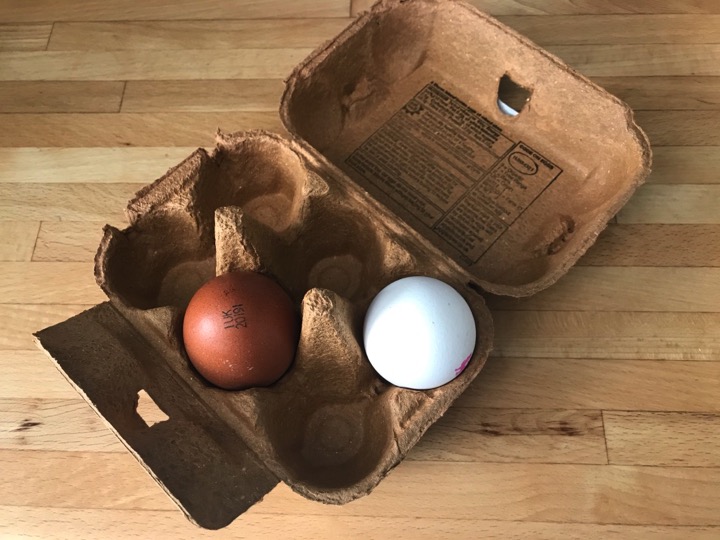
So, what if you want to use imagery in a real life presentation but you don’t have faith in your sketching abilities? Capturing your idea with a photograph is a slick and original option. For instance, an egg box with different coloured eggs could represent the idea of contrasts and diversity in a team; or a photograph of a tree could evoke the concept of growth while keeping your roots in tradition. Moreover, if you take your own photographs, you own the copyright!


Presenting slides remotely

When you share your slides, remember that they can’t do all the work on their own. Your voice is crucial for directing the viewers’ attention, and your energy is crucial for directing their feelings about the arguments you’re making. Talking relentlessly all through the event will exhaust your viewers, whose only hope will be to zone you out so that they can read in peace. Prepare to deliver a voiceover that primes the viewers emotionally through tone, but also leaves pauses for insights to sink in.

There’s a widespread expectation that the slides you use as a visual aid during a presentation have to do double duty as a takeaway reference for your audience. This is true whether we’re remote or IRL. The pressure that speakers feel to accommodate this requirement can force them into creating a dull, over-explained deck that makes them redundant as communicators. The best way to manage this challenge is to make twoversions: one for broadcast, and another for the audience to consume in private – whether before or after the actual event. Your handout version can be detailed, and provide all the extra information and explanation that someone might require. This will liberate you to create an appealing, uncluttered deck that will keep your audience focused while you, as the presenter, supply the significance to the visual elements that have hooked them into paying attention.


Whether you’re presenting live or remotely, don’t forget your slides are there to help you engage and persuade.


Your face in a box: how to curate your onscreen image

In a live environment, we exchange a huge amount of non-verbal information. We don’t usually acknowledge this, and most of the time we may not even be conscious of it. Yet our relationships are based much more on rapport than the words we exchange. We interpret physical proximity, gesture, posture, breathing, a whole range of barely perceptible noises, twitches, and, perhaps most importantly, eye contact.

A lot of this essential information is lost in remote communication. In Zoom, Microsoft Teams or any other platform, a 2D image of your face in a box is all that your viewer has to connect with, along with an electronically compressed version of your voice.

And that’s before you factor in all the technical tasks that demand our attention, and distract us from each other and our human needs. To add to the challenge, some elements aren’t within our control. We’ve all endured sporadic screen freezes where our meeting partners are caught in unflattering grimaces, or odd dislocations of sound and image. And if that’s happening to them, what on earth is happening with our image on their screens?

We can’t prevent Wi-Fi signals dropping unexpectedly, or the compatibility struggle between certain platforms and some hardware. We can’t change the fact that looking at another person’s eyes onscreen is not eye contact. Technology can’t help, or at least not yet. All this, we have to live with, for now.

That doesn’t mean that there’s nothing we can do to mitigate the alienating effect of remote communication.  Applying some basic principles will help you prepare better and manage better in the moment too.


Your face

Think about the picture you’re creating for your viewers. Make it easy for them to connect with you by choosing a central position for your face within the frame.

If you don’t know what the picture will look like, take a test before your video call. Check that sitting back or forward doesn’t chop off part of your head or to give people a view of the inside of your nostrils. Remember that you are being viewed from wherever your camera is positioned on your device, not by the screen itself. How far you are from the camera will determine how much of you the viewer will see. To paraphrase Father Ted, if you sit far away, your image will seem small and remote, while if you lean in close to your screen above the camera, your viewer may experience you as looming towards them.

Rather than hunching yourself uncomfortably to fit into the frame, try moving your device onto a stack of books to raise your laptop. If you’re using the camera on your phone or a tablet, you can benefit from a tripod (with a cradle to secure the device) to ensure you’re getting the best height and angle. Now that so much of our communication is remote, using a dedicated device for video conferencing seems less of an indulgence.

Some platforms chop up your frame in a way that you may not be able to preview, such as Microsoft Teams. So, it’s worth checking in with your meeting partners that they can see you properly at their end, particularly if you’re alternating between your face and screen-sharing slides.

If you need to demonstrate an activity, consider adding a secondary webcam. For instance, a piano teacher will want one camera to focus on her face, and another to capture her hands moving across a keyboard. If you need include whole body physical movements, you may need to stand up and position yourself at a distance from the device.

The value of good framing isn’t merely aesthetic. It’s about making rapport easier by removing anything that will distract your audience from connecting with you and your message.

If you have an important point to make, or want to share a moment of deep feeling, you will have to make the decision to tear your eyes away from the faces on your screen to gaze at the tiny pin-prick of the camera on your device. It will feel unnatural, and of course you won’t get any visual feedback from others as you would IRL. However, it creates an impression of eye contact for your meeting partners.

Don’t fix your gaze on the camera, however, unless you are conducting a webinar for a large number of people, whose faces you can’t view anyway. In a smaller meeting, you will still benefit from the limited information you can glean from looking at the faces of others, so do request that everyone keeps their video on.

Another challenge of communicating remotely from our homes is finding the space to create all these set ups. Good composition takes into account background and lighting too.


Backgrounds

There’s no strict right or wrong about this, but be aware that your setting will feed the audience opportunities to make assumptions about you.

During the Covid 19 Lockdown, the overwhelming majority of us are working from home. Just finding a quiet room where we won’t be disturbed can be a challenge. Inevitably, bedrooms have become a refuge. However, consider whether the background of headboard and pillows is going to send the signal you want. My view is that it paints a picture of someone convalescing, which in current times, may be true in a literal sense!

Bookcases have become popular backgrounds if you want to present yourself as a learned expert. The BBC politics programme, Newsnight, has noted that men in particular have chosen to bulk up their status with well-packed shelves. Your reading material may become a hostage to fortune, though. For a satirical take, follow Bookcase Credibility on Twitter, for tongue-in-cheek personality analysis based on bookcase content and arrangement.

Another factor to consider is that the standard camera on a tablet or laptop will focus on everything in the frame, not just on you, so double-check for visual distractions within the environment. If you sit in front of anything too intriguing, like family photos or dramatic artworks, or even a controversial book you may find yourself upstaged.

If you don’t want to look like you’re making a scripted statement in a hostage video, avoid an entirely bare white wall. Zoom’s Virtual Backgrounds and background blurring apps have had a novelty moment, but now may signal to some that you have something to hide.

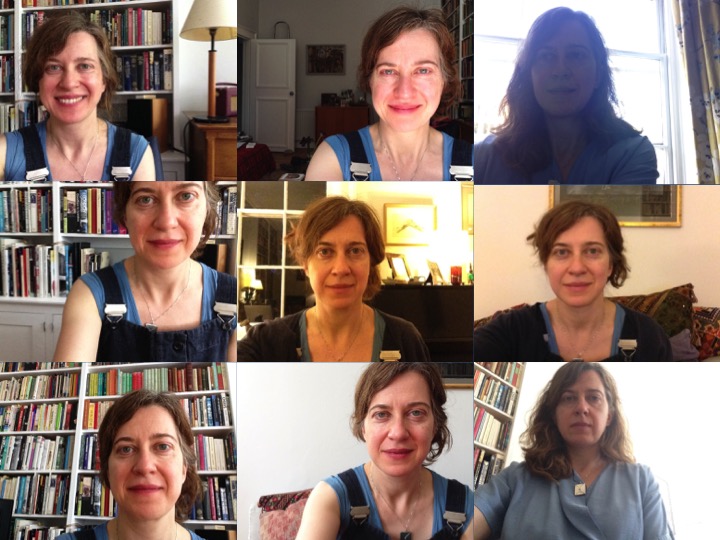
As you can see from the grid in the photo above, there are several ways of making good or bad choices. There’s an immediate impact on the quality of engagement for the viewer.


Lighting

Light changes throughout the day, so be aware that what worked well in the morning may work badly in the evening. Be prepared to move to another spot so that you’re lit in a way that makes you properly visible at the very least, and flatters you at best.

In daytime, be prepared to draw your curtains or blinds if there’s too much glare. Sitting in front of a window on a bright day will turn you into a silhouette.

In the evening, if you have any table or freestanding lamps, rearrange them to give you “fill” light as well as light on your face. Experiment with what you have to hand before you invest in any new equipment. If you are going to take this more seriously, there’s lots of specific advice on the internet, such as

Three Point Lighting Setup (Best Lighting for YouTube Videos Tutorial

If you wear glasses, you have the extra challenge of handling reflections from your screen. Whatever, if your light is coming from just one source, you may end up with very stark contrasts. This is great for edgy film noir, but perhaps not the look you want to go for when pitching your organisation’s financial services to a new client.

Let’s think about evening shots. In the image on left side of the middle row of the grid, I have a few ordinary table lamps in front and to the left of me, and in front and to the right. No fancy extras, yet this arrangement provides a soft light that doesn’t create a lot of distraction. However, in the middle image of the top row, I’m just lit by the screen and it’s making me squint a bit. The darkness of the background creates a slightly uncomfortable vibe.

The first image of the top row is a decently lit daytime shot.

While all this may seem like a lot of preparation, if you regularly present from the same location, it is worth giving your setting and composition some thought. You’ll be rewarded later as you maintain your onscreen personal brand, and you can get on with the more important business of making a human connection.